Dissecting AI Agents · Part 1
Inside an AI Agent
In the first episode of Dissecting AI Agents, we turn a Python chatbot into an agent. We keep the model, give it one tool, and build the loop that returns the result.
Trace the tool call
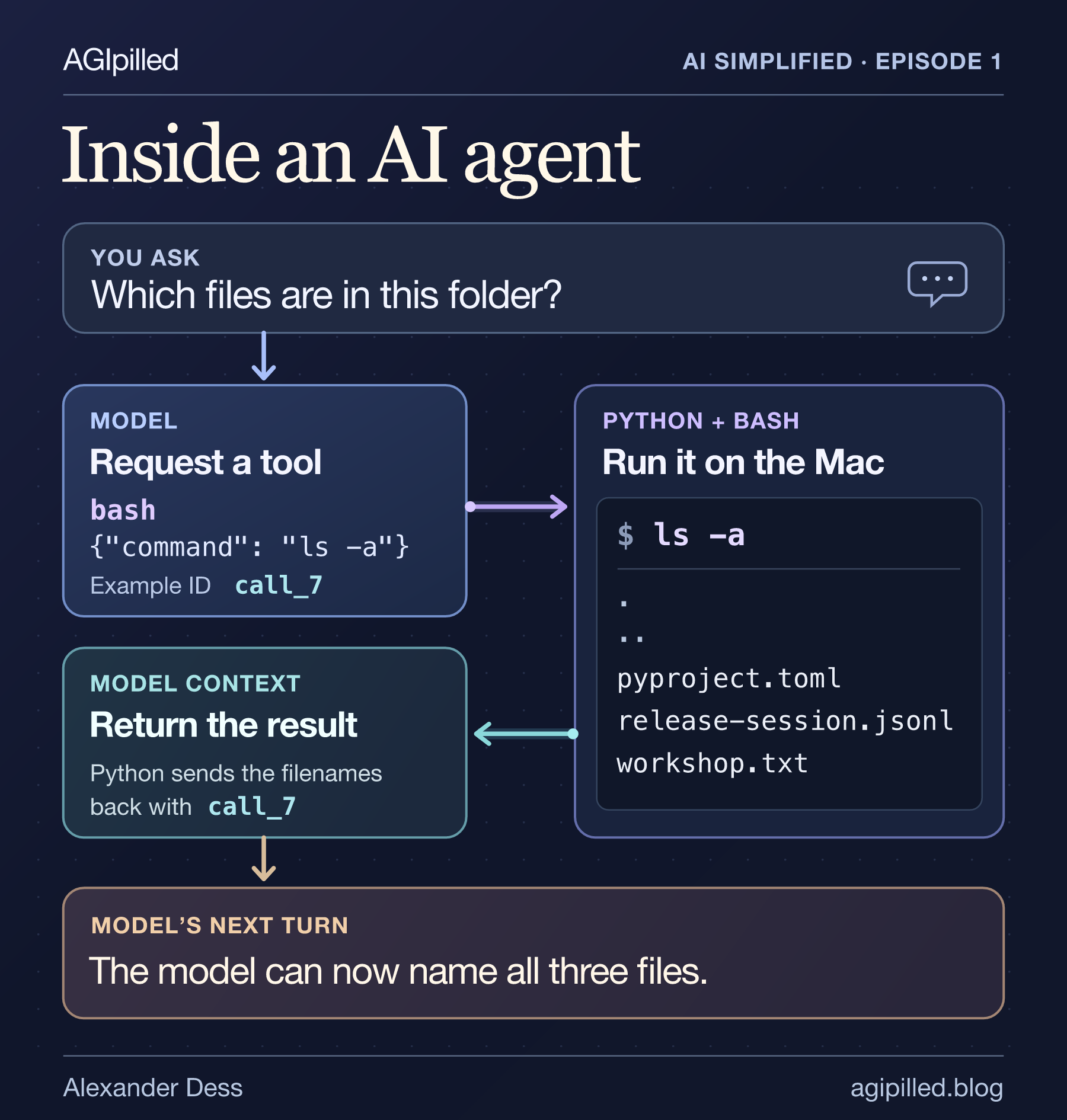
The same call ID connects the filenames that came back from my Mac to the command the model requested.

Send the conversation
DessChat.py sends the user’s message and the conversation so far to the model. It keeps the reply in history for the next turn and prints the text.
history.append({"role": "user", "content": question})
reply = client.responses.create(
    model=os.getenv("OPENAI_MODEL", "gpt-6.2-sol"), instructions="Answer briefly in plain text.",
    input=history, store=False, include=["reasoning.encrypted_content"],
)
history.extend(reply.output)
print(f"\nDessChat> {reply.output_text}\n")
Give the model a tool
In DessCode.py, we pass tools=[BASH] with the same request. The tool definition tells the model it can ask for a shell command using one string argument, command. Python checks the reply for that request.
calls = [item for item in reply.output if item.type == "function_call"]
if not calls:
    return reply.output_text
Run the command and return the result
In the video, the model requests ls -a. Python runs it and puts the output in history. The call_id ties those filenames to the command that produced them.
call = calls[0]
command = json.loads(call.arguments)["command"]
print(f"\nBash> {command}", flush=True)
output = run_bash(command)
print(output, flush=True)

# Build the next call's context. Match the result to the original request.
history.append({"type": "function_call_output",
                "call_id": call.call_id, "output": output})
The loop sends that updated history to the model. It can request another command or answer in words. This example allows up to five requests per question.
The film uses Bash on my Mac. The GitHub workshop runs the same exercise in a disposable Linux container.
What should we dissect next? Tell me on LinkedIn.